If you work in marketing, ecommerce, or content creation, you already know the pain: you have a perfectly good image, but it’s not quite right. The background is wrong. The lighting doesn’t match your brand. The model is wearing the wrong outfit. The composition needs to be square instead of portrait. In the past, fixing any of this meant either firing up Photoshop or reshooting the entire thing. In 2026, neither is necessary.
Image-to-image AI has become the workhorse of modern creative teams — the tool that quietly handles 80% of the visual edits that used to eat up entire afternoons. In this guide, I’ll walk you through how the technology actually works in practice, where it shines, and how to build it into a workflow that saves you real time every week.
What Image-to-Image AI Actually Does in 2026
Let’s clear up a common misconception first. Image-to-image AI isn’t just a fancy filter. It’s a category of models that take an existing image as input and transform it — preserving what you want to keep while changing what you don’t. That could mean swapping a background, changing an art style, upscaling resolution, restyling a product shot, or generating ten variations of the same composition with different lighting.
The leap forward in 2026 is control. The models we’re using now can hold onto specific elements — a face, a logo, a product silhouette — while freely reimagining everything else around them. That’s what makes the technology finally useful for real brand work, not just experimentation.
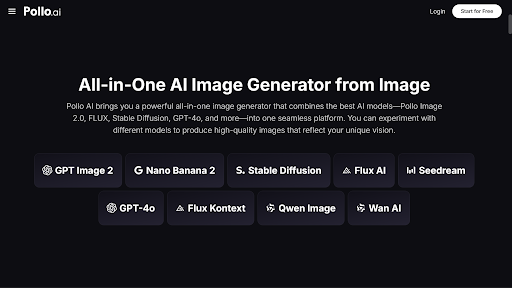
My current go-to for this kind of editing is Pollo AI’s image to image AI tool inside the Creative Studio. What I appreciate about Pollo AI is that it aggregates multiple top-tier models under one interface, so you can compare outputs from different engines on the same source image and pick the winner. For small marketing teams, this aggregator approach has become essential — paying for five separate subscriptions to test which model handles which task best just isn’t sustainable in 2026.
The Use Cases Most People Are Missing
When people first hear “image-to-image AI,” they think of style transfer — turning a photo into an oil painting or a Studio Ghibli scene. That’s the fun version, but it’s not where the real ROI lives. Here’s where I actually see teams getting value this year.
Background replacement at scale. If you sell physical products, you probably have hundreds of photos that need consistent backgrounds. Image-to-image AI handles this in seconds per image, with results that look genuinely shot in-environment rather than awkwardly composited.
Brand-consistent restyling. Got 50 photos from a 2023 campaign that don’t match your 2026 brand guidelines? Restyle them in batches. The AI keeps the people and products intact while updating the color grading, mood, and overall aesthetic.
Variant generation for ad testing. Instead of running ads with one creative, generate ten variations — different angles, different settings, different color schemes — and let the data tell you which one converts.
Reference-based editing. Upload a source image plus a style reference, and the AI fuses them. This is how a lot of fashion brands are now producing on-model content without booking another shoot.
How to Get Better Results on Your First Try
After spending most of the last year inside image-to-image tools, here are the habits that have actually moved the needle for me.
Start with the strongest source image you have. Resolution, lighting, and composition all carry into the output. Garbage in, garbage out applies more here than anywhere else in AI tooling.
Write prompts that describe what should change, not what’s already in the image. The model can see the input. Your job is to direct the transformation, not narrate the existing photo.
Use reference images whenever the tool supports it. Words can only describe style so far — a visual reference cuts through ambiguity instantly.
Generate in batches, not singles. The marginal cost of generating four variations is almost zero, and the quality difference between the best and worst output is usually significant. Always pick from a pool.
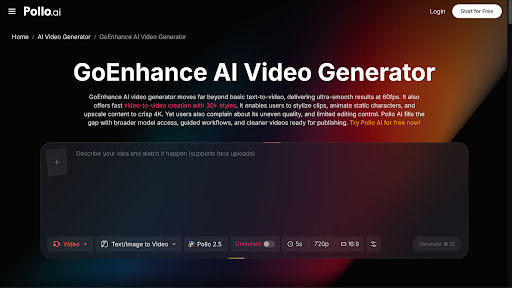
For more advanced workflows — video stylization, animation enhancement, or motion-preserving edits — Pollo AI also integrates GoEnhance AI into the same credit system. This matters when your project starts as a single image and grows into something animated. Once you move from static visuals to video, an AI video generator can also help turn those edited images into engaging video content without requiring a completely separate production workflow.
When Image-to-Image AI Isn’t the Right Answer
Even with how far the technology has come in 2026, there are situations where I still reach for something else.
If you need pixel-perfect edits — removing a specific blemish, retouching skin texture, or adjusting one tiny element — traditional editing software still wins. AI is excellent at broad transformations and average at surgical precision.
If you need text inside the image (signs, product labels, packaging copy), be careful. The latest models have improved dramatically on text rendering, but it’s still worth a second pass to verify spelling and layout.
And if you need real photographic evidence — for journalism, legal use, or anything where authenticity matters — AI editing is obviously not the answer. Use it for marketing, content, and creative work, not for documentation.
A Real Workflow for Small Marketing Teams
Here’s what a typical week looks like for a team that has integrated image-to-image AI properly.
Monday: Pull all product photos from the upcoming campaign. Run them through background replacement to match the seasonal color palette.
Tuesday: Generate ad variant sets — three creative directions, four variations each. Send it to the performance team for testing.
Wednesday: Repurpose top-performing creatives from last month. Restyle for new platforms, new aspect ratios, new audiences.
Thursday: Restyle older catalog images to match current brand guidelines.
Friday: Review the week’s outputs, archive the winners, and update prompt templates based on what worked.
This kind of cadence simply wasn’t possible two years ago without a dedicated designer. Pollo AI’s Commerce Studio is specifically tuned for this rhythm, with templates and presets built around ecommerce and marketing use cases.
Final Thoughts:
Image-to-image AI has quietly become one of the most practical tools in the 2026 creative stack — less hyped than text-to-video, but used far more often in actual day-to-day work. The brands winning right now aren’t the ones with the biggest budgets; they’re the ones who’ve figured out how to iterate faster than their competitors. Platforms like Pollo AI make that iteration cheap and accessible, which means there’s no longer a good reason to be slow.