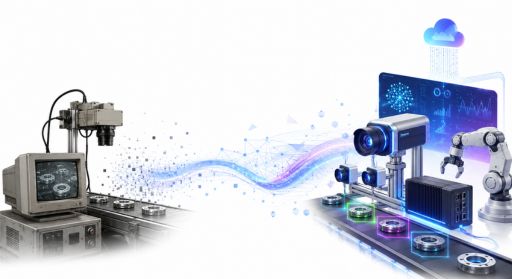
Legacy vision systems were built for a different era. Most run on proprietary hardware, lack API support, and can’t handle real-time data at the volume modern operations demand. If you’ve spent time troubleshooting a system that was already outdated the day it shipped, you know the frustration firsthand.
This article walks you through migrating from legacy vision systems to modern computer vision, structured, step-by-step, from assessing what you’ve got to choosing the right architecture and executing a rollout that won’t break production.
Understanding the State of Your Legacy Vision Infrastructure
Before making any migration decision, you need clarity on what your current system actually does. Teams that engage computer vision services typically arrive with systems sharing the same weak points: frame-rate bottlenecks, closed-loop hardware dependencies, and zero support for modern ML model formats. Other firms in this space, like Vention, have documented identical patterns when clients come in for evaluation. A proper infrastructure audit before migration saves months of rework down the line; skipping it is the most common reason migration projects stall at the implementation stage.
What “Legacy” Actually Means in Vision Systems
A legacy vision system isn’t just old equipment. It’s any system where inspection logic gets hardcoded into firmware, where swapping a camera model breaks the pipeline, or where adding a new detection class requires a vendor call and a week of service interruption. Many facilities still run systems from the late 2000s that use rule-based thresholding rather than learned features. These systems can’t adapt to new defect types without manual reconfiguration. They generate no useful data logs for downstream analytics either.
Mapping Dependencies Before You Touch Anything
Your legacy system connects to more things than it first appears. Pull line diagrams, PLC signal chains, and any middleware that bridges vision output to your MES or ERP. If your vision system triggers a conveyor stop on a defect flag, that signal path must remain intact during the migration, or you risk a production gap. Document every output: alarm signals, reject actuators, pass/fail logs, and any dashboard feeds. The goal is a dependency map you can hand to an implementation engineer without explanation.
Building a Migration Strategy That Matches Your Risk Tolerance
Every migration carries operational risk. The right strategy depends on how much service interruption you can absorb, how complex your current detection logic is, and whether you’re replacing one line or an entire plant. There’s no universal playbook. But three approaches cover most scenarios.
The Parallel-Run Method
Run your modern system alongside the legacy system for a defined period, typically four to eight weeks. Both systems process identical inputs, but only the legacy system makes production decisions. You compare outputs daily, track divergence cases, and use that data to tune the new model before cutover. This approach adds temporary hardware cost yet gives you the highest confidence in the new system before you retire the old one; it’s particularly effective for lines where false negatives carry high downstream costs.
Phased Line-by-Line Replacement
Instead of migrating everything at once, you replace one production line, validate it fully, then move to the next. This limits blast radius if something goes wrong and lets your team build migration competency on a lower-stakes line before tackling the most critical one. The tradeoff is time: a ten-line facility might take eighteen months to fully migrate. For most operations, that pace beats a plant-wide cutover that forces a hard deadline on every implementation point simultaneously.
When a Full Cutover Makes Sense
A full cutover is justified only if your legacy system is so fragile that a parallel run creates more risk than it removes, or if you’re doing a greenfield expansion where legacy and modern systems don’t need to coexist. Full cutovers work best with strong vendor support during transition, a tested rollback procedure, and a team that’s already validated the new system in staging that closely mirrors production conditions.
Choosing the Right Modern Computer Vision Architecture
Modern computer vision spans a broad range of deployment options. Organizations evaluating AI services for enterprises often discover that architecture decisions made during deployment directly impact long-term scalability, maintenance costs, and model performance. Your choice of architecture shapes cost, response time, and maintainability for years to come.
Edge Inference vs. Cloud Processing
Edge inference runs the model on hardware physically close to the camera, which means sub-100ms response time and no dependence on network availability. It’s the right call for high-speed inspection lines where a cloud round-trip would introduce unacceptable delay. Cloud processing makes sense when you’re aggregating data from many cameras for trend analysis rather than real-time pass/fail decisions. Many modern deployments use a hybrid approach: edge inference for real-time decisions, cloud sync for model retraining and analytics.
Model Selection and Training Data Requirements
The model you choose needs to match your defect taxonomy. A general-purpose object detection model trained on COCO datasets won’t perform well on micro-cracks in ceramic tile without fine-tuning on your specific defect samples. Plan for a minimum of 500 to 1,000 labeled images per defect class to reach production-grade accuracy; budget time for iterative retraining as your product mix changes. Open-source architectures like YOLOv8 or EfficientDet give you a strong foundation. The real differentiator? Quality and diversity of your training data.
Integration with Downstream Systems
Your new computer vision system needs to speak the same language as your MES, ERP, or quality management software. Define the output schema early: JSON payloads, OPC-UA signals, MQTT messages, or REST API calls. Avoid relying on generic connectors or quick fixes, as the hidden cost of data integration shortcuts can create performance bottlenecks and compatibility issues during large-scale computer vision deployments.
Here’s the thing: this is where migrations most often hit unexpected delays, because the vision team and the IT/OT team frequently have different assumptions about data formats and timing. Lock down a shared spec before development starts. Test implementation endpoints in staging before any live production data flows through.
Retraining Your Team Alongside the Technology
A modern computer vision system doesn’t run itself. Your operators, quality engineers, and maintenance staff all need different relationships with the new system than with the old one.
Operator Roles Change After Migration
Legacy systems typically required operators to manually tune thresholds or swap filter settings. Modern systems shift that work to model management: reviewing flagged images, approving retraining batches, monitoring confidence score distributions. Operators who understood the old system’s quirks may initially distrust a model-based system that doesn’t expose its logic as transparently. Address this early with clear dashboards showing why the system flagged a specific part, not just that it did.
Maintaining Model Performance Over Time
Models drift; that’s reality. Your product formulations change, lighting conditions shift seasonally, new defect types emerge. Build a model monitoring process into operations from day one: track precision and recall weekly, set thresholds that trigger a retraining review, maintain a labeled holdout set so you can measure model performance objectively. Without this, a migration that succeeds at go-live can quietly degrade over six to twelve months until defect escape rates climb back to where they were with the legacy system.
Conclusion:
Migrating from legacy vision systems to modern computer vision is a technical project with serious operational stakes. Start with a thorough infrastructure audit. Choose a migration strategy that fits your risk tolerance. Lock down your implementation specs before you write a line of code. Match your model architecture to your actual response time and accuracy requirements; build team capability alongside the technology so the system stays effective long after go-live. Organizations that get this right treat the migration not as a one-time swap but as the foundation for a continuously improving inspection program.